
Open source · MIT · Self-hosted

The settlement day for
everything you subscribe to.

Your subscriptions are scattered across cards, regions and currencies. Calends keeps them in one ledger: what renews when, what it costs, and what a year really adds up to.

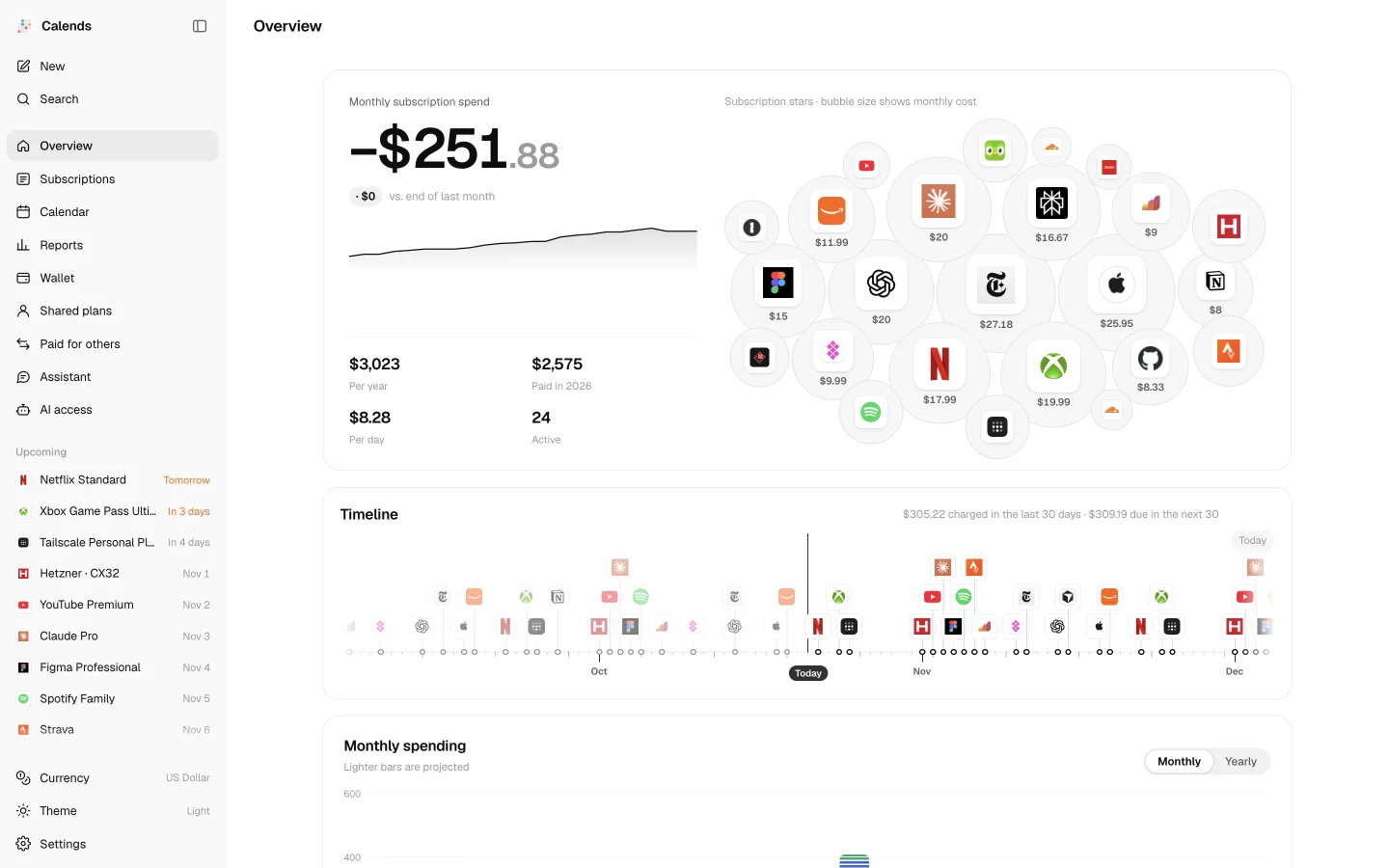
Calends overview: monthly spend, subscription bubbles and a charge timeline
Calends overview on a phone

Subscriptions

Every subscription, every cycle

Monthly, yearly, every n days, lifetime. Trials, intro prices, pauses and “won’t renew” each have a state. Price changes, region switches, gaps and resumptions stay in the history.

Cycles and price history
Subscriptions as cards

Calendar

What renews, and when

A month view for every charge and a year view for the rhythm. Subscribe to a private ICS feed in Apple or Google Calendar, and get reminded before each charge, at the time you choose.

Calendar and reminder rules
Calendar month view with this month’s charges

Reports

See where the money goes

Spending trends and month-over-month changes split into FX, new, price hikes and cancellations. Then a checkup: yearly renewals coming up, quiet price hikes, balances about to run dry.

How each figure is computed
Reports: spending trend, monthly changes and checkup

Wallet

Every card, every balance

Bank cards, App Store balances per region, prepaid SIMs and merchant credit. Calends works out how many charges a balance still covers and when to top up.

Wallet and runway
Wallet with payment methods and balance runway

Shared plans & paying for others

Split fairly, get paid back

Organize a shared plan, track who has paid until when and collect in one tap. Things you pay for friends get their own ledger, including what FX and fees cost you.

Shared plans

Member splits, what’s owed, net yearly cost.

Shared plans with members and amounts owed

Paid for others

Pay for a friend, collect per period, see the difference.

Paid for others: paid, collected and owed
How shared plans add up

Built-in assistant

Drop in a receipt, and it’s recorded

Paste an App Store receipt, a bank text or a screenshot of a billing page. The assistant reads the name, price, cycle and payment method, checks your ledger for duplicates and drafts an entry. Nothing is written until you confirm.

  • Text, screenshots, or both
  • Drafts first, saved only when you confirm
  • Or just ask: what do I pay this month?

Uses your own DeepSeek API key, stored only on your server.

The built-in assistant
Assistant: a subscription draft made from a pasted receipt

AI access

Let the AI you already use read and update it

Calends ships with an MCP server. Connect Claude Code, Codex, Cursor or Grok Bot, then ask “what renews next week?” or say “Netflix went up to $17.99 from today” and it’s done.

  • Claude Code
  • Codex
  • Cursor
  • Gemini CLI
  • Grok Bot
What renews next week?
Three: Spotify (Sun), iCloud+ (Mon), ChatGPT Plus (Tue). All on your default card.
Netflix went up to $17.99 from today.
Recorded: $15.49 → $17.99 from today. Past charges are unchanged.
MCP setup and tool list
AI access page: pick an assistant and copy its config

Reminders

A heads-up wherever you’ll see it

Calends checks daily at the hour you pick, reminds you a few days before each charge and sends a monthly digest. When a shared-plan member is due, it reminds you to collect.

  • Email
  • Telegram
  • Lark
  • DingTalk
  • WeCom
  • Slack
  • Discord
  • Bark
  • ntfy
  • ServerChan
  • Webhook
Setting up each channel

Public page

Show it off, if you like

An optional read-only page. You choose which subscriptions appear, sensitive details are masked on the server, and the avatar and title can be your own.

Public page with monthly spend and timeline

Self-host

Run it where you want

No sign-up, no subscription fee. The code is open, and your data lives only where you deploy it.

Cloudflare

Recommended

Workers + D1. The free tier is plenty for one person.

git clone https://github.com/imetn/calends
cd calends
npm ci
npx wrangler login
npx wrangler secret put SETUP_TOKEN
npm run deploy

Then open /admin, enter the setup token and choose a password.

Deploy

Docker

Any machine

A NAS, a VPS or the computer at home. Your data is one SQLite file.

docker run -d --name calends \
  -p 8787:8787 -v calends-data:/data \
  ghcr.io/imetn/calends:latest
docker logs calends

The first start prints a one-time setup token in the logs.

Let your AI agent do it

Paste this into Claude Code, Codex or Cursor. It asks where to deploy, then does the rest.

Deploy Calends (https://github.com/imetn/calends), a self-hosted subscription ledger, for me:
1. Ask whether I want Cloudflare Workers or Docker, then follow the README to deploy it.
2. Give me the URL and the setup token, and wait while I set a password.
3. Create a read/write token on the AI access page and connect Calends to yourself over MCP.
4. Go through my email, find every subscription receipt and renewal notice, and turn them into subscriptions (name, price, currency, cycle, start date, payment method). Preview each one with dry_run for me to confirm before adding it.
Full deployment guide

Your ledger is yours

MIT licensed

All code is on GitHub. Use it, change it, share it.

No central server

Data lives in your own D1 database or SQLite file.

No analytics in the app

Outside calls are only public FX rates, plus the AI and channels you set up.

Take it anywhere

Full JSON backup and restore, CSV import and export.

Give your subscriptions a ledger today.

Five minutes to deploy. Every charge accounted for after that.